Macintosh Gripes: Poor Usability

I’ve had many computers over the years, and many of those have been Apple Macintoshes. I’ve had an SE, PowerMac 7200/75, iBook, Mini, and currently a MacBook Pro. Up through about 1997 I considered myself to primarily be a Mac user, but I switched because I was using and developing for the web more and more, and Mac web browsers were slow and poor, to put it kindly. I was also developing on Microsoft Access quite a bit, and there was no Mac version (and there still isn’t). When I started at StyleFeeder I had a choice and opted for Mac because that’s what the other developers were using, and I have to admit I regret that decision.

Macintosh OSes, especially OS X, is often praised for it’s quality and usability. Back in the old days, I’d agree. System 7 was hands-down better than Windows 3.1 in pretty much every way I can think of. These days, I’d say the tables have turned and can’t think of any way that OS X is better than Windows XP. They both crash infrequently, but I’d give a slight advantage to XP as it only crashes for me once or twice per year, while the Mac has done so at least twice since August. The Mac came with some decent software for dealing with movies and making music, but I don’t do much of that stuff and if I did, I’m sure I could find similar Windows software.

My main cause for regret is the overall usability of the OS. There are three main issues here. The lack of keyboard access to commands, the antiquated menu bar and the MDI.

As a full-time developer, I’m in the power user caste. I am constantly trying to find the shortest and easiest way to get things done. Nobody with half-a-clue about usability would argue that the mouse is an efficient command tool. It’s obviously the ideal way to select things and navigate spatially, but once you’ve gotten where you need to go, you are ready to start issuing commands. On Windows, every command is accessible via the keyboard. Common operations have simple key-combinations, more obscure ones will have more complex combinations. Control-P prints, Control-S saves, and so on. For tasks that are more specialized or used rarely you will likely have to use things like Alt-F-W-F (makes a new folder in explorer) or Shift-Control-F (formats code in Eclipse). These don’t need to be easy, but they are there and every user will find themselves learning a few of them depending on what they do often.

On a mac, no such luck. Some things like printing and saving are common, but after that it’s seemingly random and left to the application developer to implement commands, and most don’t. So I have to stop what I’m doing and reach for the mouse all the time. In usability terms, this is a fairly significant hurdle and has a high cost which I find unacceptable. Apple reluctantly introduced “universal keyboard access”, but it’s really bad and clearly a begrudged afterthought that makes you use the arrow keys to navigate menus.

The second gripe is the way OS X sticks the menu/command bar at the top of the screen. The logic here is that it’s easier to target something thats at the top of the screen because the mouse won’t go past it, and also that it’s always in the same place. That makes sense in theory, but fails in practice. As mentioned above, the mouse is a last resort for issuing commands, so by the time you’ve reached for it you’ve already incurred significant expense. Spending the extra 50ms target it is a minor addition to this.

Where the fixed menu bar really fails is when you use more than one monitor, because it sticks it to the top of the primary monitor. If you’re working in the second monitor you now need to grab the mouse, and drag it all the way to the second screen, then drag it back.

Also, when working in more than one program, which most people do, you can’t select commands from an inactive program. You need to find a safe place to click to activate it, which is expensive and varies widely, then you can access the menu bar. In windows you can click on an inactive menu bar and it will open with that same click.

Thirdly, almost all Mac programs use what is called an MDI, or Multiple Document Interface. This means that all the windows for a program are linked together as opposed to a Single Document Interface (SDI). Microsoft realized that MDI was a poor design in many cases, and fixed this in XP. MDI makes sense for some things, such as dialog boxes and the many windows that Photoshop uses to show things like layers and pallettes. This does not make sense for things email and word processing. Just because I have two documents open in the same word processor doesn’t mean there is any relation between the two. I should be able to alt-tab to a specific document and keep the other one minimized. A minor annoyance related to this is that you can have programs running with no windows at all, which ties up resources and is just plain confusing.

Perhaps the worst part of these problems is that they could be built into the OS and be optional behaviors, but they aren’t. Apple’s stance has always been that they know best, and that options are confusing. Unfortunately they compound this defect with the fact that they are extremely slow to change things even when they are clearly wrong. For proof of this you need only to see that they still put one-button trackpads on their frighteningly hot, overpriced laptops.
Cracked Foundation: Trac

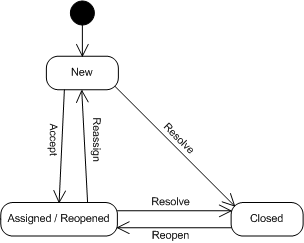
We’ve been using Trac on a project lately, and it’s a good example of an otherwise decent product being rendered almost completely useless by a simple problem. To be clear, we’re using Trac for defect/issue tracking, so if you aren’t using that part of it, this wouldn’t affect you. The rest of the system seems OK, though I’m not sure why integrating SVN commits into tickets requires some hack via Perl script (that won’t work for us). However, that’s just a lack of convenience, the real problem is the way it handles the chain of custody for tickets. Here is Trac’s state diagram for tickets:

Track Ticket State Chart

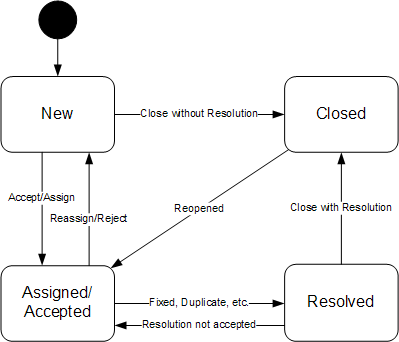
I’ve worked with many different issue tracking systems, and if you have too, you’ve probably already noticed what’s missing. I call it the “full circle” concept for lack of a better term. The crux of the idea is that the person who opened the bug should be the only one to close it in most cases. Trac does not have this. The reporter can reopen the ticket, but a closed ticket basically falls off everyone’s radar, so no validation or verification would take place. Here is the state chart with the step I’m referring to:

Minimal Defect Tracking State Chart

Even on a small team, without this step we’re running into people with clogged-up queues because it’s pretty common for developers (ticket resolvers) to also create tickets from time to time and assign to another developer. We’ve take the safe route of reassigning to the reporter rather than closing, so things should be validated before closure, but this makes the ticket queues much larger and more difficult to manage, and sometimes tickets don’t get closed until after the fix has been published.

Voting Obsecurity

December 26, 2006

The Honorable George W. Bush
President of the United States
The White House
1600 Pennsylvania Avenue NW
Washington, DC 20500

Dear Mr. President,

I hope the holidays find you well, and wish you happy and productive new year.

I am not an expert on the topic of voting, nor am I a professional security expert, but I do try and follow the news with regards to the intersection of the two. I watched the HBO documentary “Hacking Democracy” this weekend while wrapping presents, and was flat-out disgusted. It was not especially well-made, made no attempt at being objective, nor was most of its information news to me, but I was moved when I watched a mock election be rigged using actual voting systems and saw a real, respected election official be speechless and dumbfounded that his job was completely undermined.

There is no simple solution to secure voting, nor is it remotely probable that any election will ever be 100.0% honest, but there are some monumentally obvious flaws in the way we currently count votes. The largest is the issue of the lack of openness of the software, systems, and processes that are involved.

I am a software developer and most non-programmers I’ve talked to have a difficult time understanding the idea that public access to the “secret codes” of software, AKA the source code, is more secure than private or closed source code. The general opinion is that if you can see the inner workings of something, it’s easier to break it, which is valid and true. The next step in this thought process, however, is more critical and is one that most people don’t take. That is that if you cannot see the inner workings of something that is broken, it’s more difficult to fix it.

The idea of “security by obscurity”, sometimes referred to as “obsecurity”, is valid and necessary when it comes to information such as private financial data, personal information like medical histories, and intelligence gathered by our military and other government agencies. However, regarding mechanisms and processes, such as software, obscurity lessens security. This is doubly true when those mechanisms are designed to collect and analyze public data, such as votes.

Here’s a dirty secret of the programming craft: 99.9999% of software is broken. By broken I mean there is some bug somewhere in it. In new or rarely used software these bugs can be serious and misleading. In most mature software, it’s nothing serious; something doesn’t display right, some obscure error condition is handled poorly, etc. This applies to video games, email programs, ATM software, Windows, Linux, etc. as well as voting software.

So how do you weed out these bugs? You test, over and over and over again. When you find a bug, you test again, even things that you didn’t fix (AKA regression testing). Eventually, you’ve fixed all or most of the bugs that were found, satisfied your unit tests and requirements, and you ship it. Then your customer does something you never planned on, maybe because they are being silly or stupid, or you aren’t the programming god you thought you were, or your QA staff is overworked, or it just wasn’t possible for you to test in the lab. This is why you get Windows updates every week, and why there are dozens of bug fixes for every Linux kernel, patches for every video game, it’s simply unavoidable. The more something is used, the more bugs are found, and the better it becomes.

Voting software isn’t used very much. Most machines are used one day every year or two. Excel has been used by millions of people every day for nearly 20 years, and there are still bugs in it. If I’m making an inventory of my baseball cards and have a problem with Excel I can report it to Microsoft and hopefully a ticket will be opened and hopefully they will fix it. The difference between a spreadsheet package and a voting system is that my grandfathers didn’t risk their lives overseas to make sure “=SUM(D3:D13)” was accurate, they did it so that I would grow up in a better world than they did, and just as importantly, have the power to make it better for my grandkids.

It is absolutely imperative that we apply the highest possible standards of scrutiny, security, and integrity to the systems that facilitate our most sacred public right. Voting software, hardware, and system should not only be open, they should be the zenith of openness. The public should be able to download complete specifications for every piece of hardware on every type of voting machine out there, from the device I vote on to the system that tabulates it to the printers that make the reports. We should have access to every line of code used in the entire process. I should be able to test it myself and find flaws or solicit advice from those I trust. The public should have as much access to the hardware as is feasible. Regular citizens, universities and vendors should be encouraged with bounties to find and report flaws they find. Defect reports on voting systems should be legal documents, also open to review by all. There should be digitally signed video publicly viewable via live broadcast or within hours of all access to every machine with the sole exception of the person casting a ballot. There is room for only ONE secret in this entire process, and that is who an individual voted for.

I would be exceptionally pleased if you would propose or support legislation to help protect our votes by virtue of an open and honest process. It would not only validate the sacrifices millions of Americans have already made, but it would set an example that other democracies and future generations will aspire to.

Sincerely,

Eric F. Savage


Also sent to my Senators Kennedy and Kerry, Representative Frank, Governor-Elect Patrick, State Senators Brown and Creem and Secretary of the Commonwealth Galvin. If you feel similarly I encourage you do write to your officials and feel free to borrow or copy from my letter.

For more, better information on this topic I recommend checking out Ben Adida’s Blog and Black Box Voting. A web search for ‘secure voting’ or similar topics will also turn up piles of other opinions and (often scary) facts.

Glossary: Kilby Shortcut

Every group of friends develops a very localized parlance, usually drawn from movies they’ve all enjoyed or memorable events. My group of college friends was lucky enough to include someone who had inherited a dominant curator gene, Keith Tyler. This is well-evidenced by his contributions to Wikipedia, but also by his entering into the historical record a fairly exhaustive list of rubbonics, complete with phonetics, that would be useful in deciphering our conversations of the day.

This way's faster!Sometimes, a term or phrase has the potential to break out of the group and escape to the community and beyond, and I’m going to nominate one to do just that, or at least get it into Google. This term was apparently born after the rubbonics were codified, and I can’t remember the date, but I do remember the circumstances.

We went to the Cheri Theater (now the site of the Summer Shack and King’s bowling), one chilly Boston night. On the way back, Kilby proclaimed “this way’s faster” and promptly crossed the street. We declined to follow and proceed on our way as Kilby marched down the other side of the street. At the next intersection, he crossed back to our side of the street, but was there before us. “How?,” you ask. The answer is simple, he walked faster. This was not the first time he had performed such a feat, but it was then that the phrase “Kilby shortcut” was coined.

Kil·by short·cut

noun (kÄ­l’bÄ“ shôrt’kÅ­t’)

A path between two points which is longer than other obvious choices, but the extended length is mitigated by travelling faster.

An ironic footnote is that Kilby doesn’t drive, and never has, yet somehow is the best navigator I’ve seen when it comes to exploring cities or unfamiliary territory. Except, of course, when he says “this way’s faster”…

Naming Conventions: Java Packages

When developing, conventions can mean the difference between producing something clear and concise and producing something confusing and arcane. They exist at all levels, from the industry and the language down to specific modules of applications. I’m going to attempt to codify some conventions for aspects I use heavily, and I’ll start with one of the easier ones, Java package names. Sun has some basic ones, but I think some more specific guidelines are warranted.

  1. Names should be all lowercase. Uppercase and mixed case denote other concepts in Java and there’s no need to muddy the waters further.
  2. Names should be alphanumeric, preferably just alphabetical.
  3. Do not use version numbers or dates (see below for a possible exception).
  4. Use tld.domain-you-own.project/library.* for distributed or published code. This follows with Sun’s convention, and is the only way to know a name is globally unique, or at least that you are the one that’s allowed to use it.
  5. Do not use tld.domain-you-own.* for internal code that should not be distributed. I typically just use the project or library’s name as the first segment. This convention can be useful in signaling other developers that code is for internal use only, and if something is converted from internal to external usage, this will help identify which version an application was built against.
  6. Package names that are nouns should be singular (mycompany.myproject.account). This maintains consistency with packages that are named for actions (mycompany.myproject.search) and adjectives (mycompany.myproject.common).
  7. Store DAOs in a “data” subpackage. This helps the tree-views in IDEs and also allows for easier control of logging. If you’re being formal and encapsulate DAO operations in a manager class, the manager class should not be in the data package because it’s grammar is business-based, not persistence-based.
  8. Classes that are heavily dependent on third-party packages should be in a subpackage named for the primary dependency. A Hibernate implementation of your DAO should live in mycompany.myproject.data.hibernate. This helps greatly with logging configuration. This is one place where version numbers are permissible, such as mycompany.myproject.data.hibernate3. Use this exception very sparingly, as it can be confusing with regards to forward compatibility.
  9. Classes that are extensions of third-party code should be named for the dependency and be outside of the project’s or product’s context. For example, if you are creating a new type of controller for Spring MVC that does not depend on project-specific code, put it in mycompany.spring.controller. If it is integrated with the application, see the previous point.
  10. Don’t expose organizational details in the package structure (mycompany.mydepartment.myproject). Naming packages by department, office, or region will surely be confusing soon due to management’s penchant to reorganize and reassign.

I consider the above a work in-progress, and welcome comments.